
-
6th August 2021, 12:16
#41
Cake!

It's been a year. Time for some server stuff!
I noticed there's been significant chunk corruption on the Vanilla 1.16 world. The shopping island has been wiped along with half of someone's base near spawn and my witch farm is also cut in half. The automatic backups only keep a week's worth of daily backups. I manually backup those backups to my own PC from time to time, but as posted in a different thread the disk I use for that isn't in great shape so I'm unable to restore the corrupted chunks. Those chunks have been automatically regenerated but all the work that was put into them is gone I'm afraid.
I'm currently working on setting up better backup facilities. A friend has provided a Dell workstation. I've bought four 4TB WD Red drivers, 48GB ECC memory and an Areca raid controller. The daily backups will stay where they currently are, on a 1U rack server at my place. On the new server I'll be doing weekly and monthly backups. Weeklies will be saved up to 1 month and the monthly backups will be saved up to 1 year. The new server will be hosted off-site at my friend's place. He's also generously paying for the electricity.
So all in all this backup server, or server for backups, which ever you want to call it, it going to cost me around 600 euro and a bunch of time to setup. If you're feeling generous and would like to contribute, there's a PayPal button on the home page 
-
10th September 2021, 09:39
#42
Cake!
How cool is that?
I got a second hand Areca of Ebay and put it in the backup server to run the new drives in raid 5. When configuring the controller I noticed this:
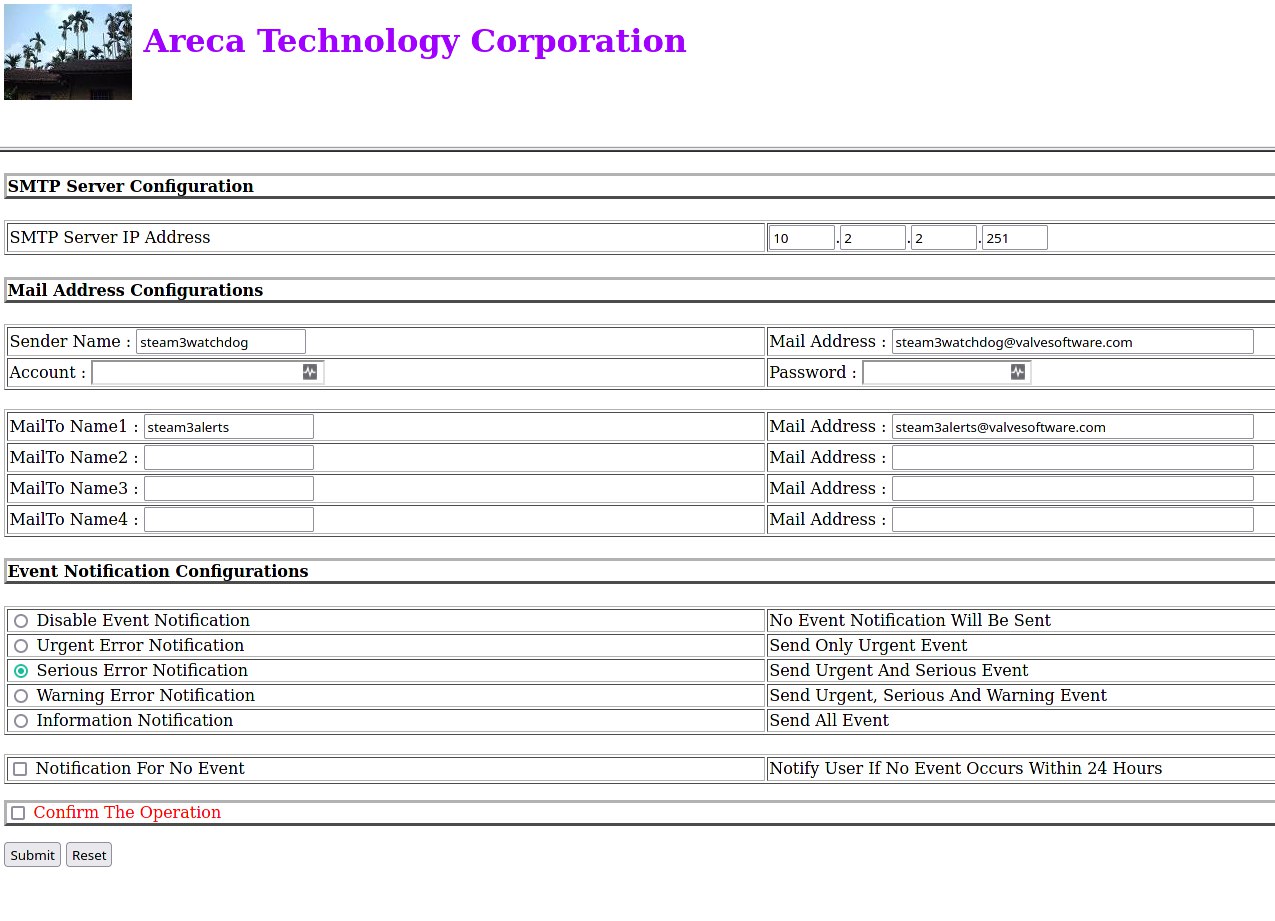
Looks like the previous owner didn't factory reset the controller before sending it to me. It appears to be an old raid controller from Valve. Who knows, perhaps it was even used to serve game content to Steam users at some point.
-
10th September 2021, 13:14
#43
Minecraft Addict

-
12th September 2021, 21:27
#44
BOFH

-
23rd September 2021, 10:04
#45
Cake!
Servers are down for a bit
Like I've mentioned elsewhere I've upgraded the server with three 1TB NVMe SSDs. Two of these will host the game servers on a raid1 array while the third will be used for Dynmap.
Right now the server is copying all the files over from the old virtual hard disks to the new ones. This will take a while so I'll just let that run while I do other things
-
23rd September 2021, 13:17
#46
Cake!
Servers are up again!
Lunch break update.
Copying the Minecraft servers from HDD to SSD went fairly quickly. I've added the appropriate services. Installed Java 8 and 16 from AdoptOpenJDK and put the correct paths to those in the appropriate Minecraft monitoring scripts. And then they all just started. No fuss or crazy errors.

Now all that's left is to copy over the Dynmap tiles. This is going to take much longer. Our Dynmaps consists of millions of tiny jpg/png files. Copying those over is relatively slow. It's much faster to copy a single large file rather than a lot of smaller ones even if the amount of GB is the same.
Right now we have around 536GB of Dynmap data and so far 35GB has been copied to SSD going at an average rate of about 7MB/s. So for now the Minecraft servers will display Dynmap, you're just missing the tiles which means you're basically looking at the void. As the rsync job progresses the Dynmaps will become complete again. Remember when rendering the TerraFirmaCraft server's Dynmap took a week? This won't take that long though.
As far as performance goes. The Minecraft servers are noticeably faster now. Loading chunks when flying across the map is nearly as fast as when running it on a local machine. The parts of Dynmap that are already present also load much faster. It's great. I like it a lot
-
4th December 2025, 18:19
#47
Cake!
Some more server stuff
With most of the RAM being bought up by OpenAI I no longer think it's reasonable to upgrade my server next year when the new AMD CPU's with 12-core CCDs come out. RAM prices have skyrocketed and aren't expected to come down any time soon, at least not until the AI bubble bursts. So instead for now I'm just upgrading the CPU from a 3950X to a 5950X and will ride out the old AM4 motherboard until RAM prices become reasonable again.
This will give the server about a 20% boost in CPU performance. Nothing major really but nice to have. What will make more impact is that I'm going to switch from VMWare ESXi to the Proxmox hypervisor to run my virtual machines on. The reason for this is that VMWare has decided that people can no longer use ESXi in their homelabs. Also they increased prices to such a degree that if you are a 'small' customer with say, 1000 servers, you can no longer afford VMWare.
The plan was to build a new server, install Proxmox and use the import function to copy virtual machines from the current server to the new one. But since I'm not building a new server as I had planned I'm going to have to do some server shenanigans. I'm adding a Broadcom Avago 9306-24i 12Gbps SAS HBA Controller and twelve 3.84TB WD Ultrastar SS300 data center SSDs.
The plan is to then install Proxmox on two small 256GB SSDs (RaidZ mirror), mount the drives on the Areca controller and convert the VMWare virtual machines to virtual machines that can run on Proxmox and hope nothing will go wrong. I do not think this is the recommended way of doing things but I'm not going to let that stop all the fun. It's not like this is rocket science stuff where they blow up rockets for a living :B
I'm not sure yet exactly when I'm going to perform the upgrades. Maybe somewhere this weekend. If the server is down, it may be because of this.
-
6th December 2025, 23:49
#48
Minecraft Addict
I have been running Proxmox on my homelab for a long while now and it seems to be quite stable and compatible across versions and container/VM types. Still do not prefer it to the features of VMware. Donit get me started about the difficulties in Proxmox trying to forward a PCI device to a VM...
Even though it's not ideal, I am grateful for your enthusiasm to get a daunting project like this one done. Thanks for all the hard work sir!
-
9th December 2025, 03:54
#49
Administrator

Any upgrade is nice
Btw, is the TFC server going to be up?
-
10th December 2025, 12:34
#50
Cake!
TFC server is up. I've been migrating a bunch of VMs around to my friend's server and had to shut down some stuff along the way. Right now everything should be running.
Last night I did a few things to the server. I updated the bios, moved the PCI-e graphics card to the lowest slot on the motherboard. This freed up the second PCI-e slot that, along with the first slot, are connected directly to the CPU. The lowest slot is connected to the chipset but that's fine since it only has to display a terminal. I also put in the new SAS controller. And then I also upgraded the CPU to the 5950X.
The new CPU, SAS controller and SAS SSDs are all recognized and are visible in VMware ESXi so that's a good sign.
Right now there are two VMs with bulk storage and the game server VM still running on the older drives. While Proxmox is able to read VMFS volumes, support is a bit spotty. Also one version of the vmfs-tool only reads VMFS v5 and a fork of that tool only reads VMFS v6. I still have both versions and I'm not risking a VMFS migration at this point. So I'd have to compile one version, import the VM, then compile the fork version and import the rest. And hope everything works and doesn't crash or corrupt data. I'm not a fan of that idea.
Another possibility might be to use the old server motherboard I still have lying around with that 5820K 6-core Intel CPU. It doesn't have to actually run the VMs. I could just hook up the Areca raid controller with the 12 disks and import the VMs via network to the Proxmox server. Though that brings the risk of things breaking while I move stuff around.
Typing this I just got a crazy idea.
I could install Proxmox and then have a VM in which I install ESXi to which I then passthrough the Areca raid controller. Then I could simply use the import function on Proxmox to get the VMs. So I could host the remaining VMs on a VM so I can then import the ESXi VMs as new Proxmox VMs. Yeah that should work. Though I will need to migrate the game server VM from the NVMe drives to a raid array on the Areca controller. I'd better get that started.
DOM, I read your issues with PCI-e passthrough. I don't know why you were having issues but in my experience it works if you enable IOMMU in your BIOS. ESXi also doesn't work if you don't have IOMMU enabled. On consumer motherboards it's usually disabled by default.
 Posting Permissions
- You may not post new threads
- You may not post replies
- You may not post attachments
- You may not edit your posts
-
Forum Rules


 Reply With Quote

